
Smart POS System
for Restaurants
Manage costs, record expenses, and control inventory with AI that learns from your business.
✓ No credit card required
Everything Your Restaurant Needs
A complete system designed specifically for Thai restaurants.
AI Market Bill Scanner
Just take a photo of your delivery order or receipt. Our AI reads the text and records expenses automatically. No typing needed — save hours every week.
Real-Time Order POS
Manage tables, take orders, split bills, print receipts — all on one screen. Easy to use even for first-time POS users.
Ingredient Inventory
Track ingredients in real time, get low-stock alerts, and auto-calculate cost per menu item.
Reports & Analytics
View sales, profit, and costs by day or month. Make smarter business decisions with data.
Staff Shift Management
Log check-in/out, assign shifts, and calculate staff earnings — reduce human error.
Always-On Cloud Data
Check sales from your phone anywhere. Automatic backups — your data is always safe.
Customers Scan QR & Order Themselves
No need to call staff. 100% accurate orders
Convenient
Customers can order anytime without waiting for staff
Accurate
Customers order themselves — no handwriting mistakes
Fast
Orders go to kitchen automatically. Staff get orders instantly
❌ Old Way
Staff writes orders by hand, mistakes happen often. During busy hours, hard to keep up
✓ QR Code Solution
Customer scans QR → selects food → orders → goes to kitchen automatically
🧾 Customer Orders → Staff Gets Slip Instantly
When a customer scans QR and places an order, the system automatically prints a confirmation slip for staff. Staff just walks over to confirm the order verbally
Customer Scans QR & Orders
Customer scans QR on the table, selects items, and confirms — no waiting for staff. Restaurant receives orders even during peak hours
Slip Auto-Prints Instantly
System prints a 'For Staff' slip immediately — with customer name, order items, subtotal, and even a script for staff to verbally confirm the order
Staff Confirms Order Once
Staff walks to the table and says 'Thank you, let me confirm your order... you have...' — once confirmed, slip goes straight to the kitchen
Kitchen Starts Immediately
No re-entering orders. Staff hands slip to kitchen — kitchen starts cooking right away. Fewer steps, fewer mistakes
💡 Solves busy restaurants where staff can't take orders fast enough — customers self-order, slip auto-prints, kitchen starts immediately
Sample QR order confirmation slip for staff
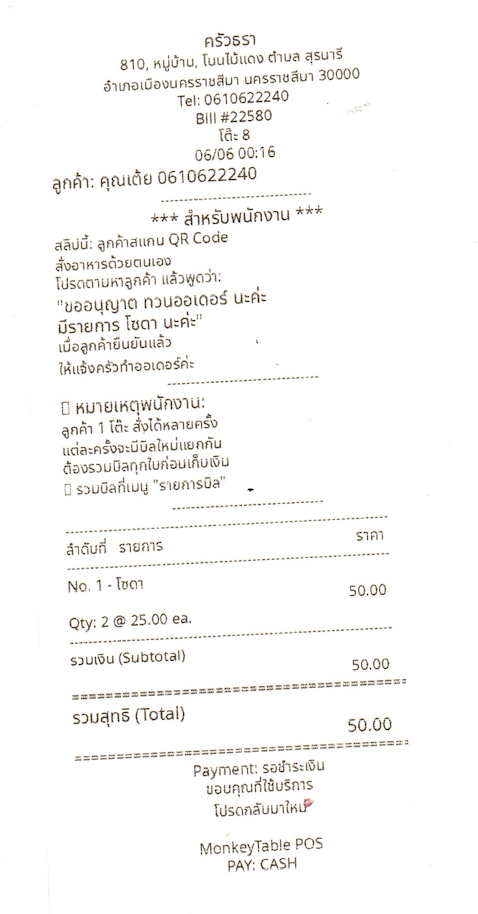
Slip shows customer name, phone number, order items, total, and staff instructions — everything in one slip
🖨️ Print QR Code per Table — Customers Scan & Order Themselves
Staff prints a QR Code slip for each table and places it there. Customers scan with their phone and order instantly — no waiting for staff
Print QR per Table
Staff prints a QR slip for each table — showing restaurant name, table number, date, and responsible staff member
Place QR on the Table
Attach or place the slip on the table. Customers pick up their phone and scan immediately — no need to call staff
Customers Scan & Order
Customer scans QR → opens online menu → selects food → confirms order — instantly sent to kitchen and POS
Sample QR Code table slip
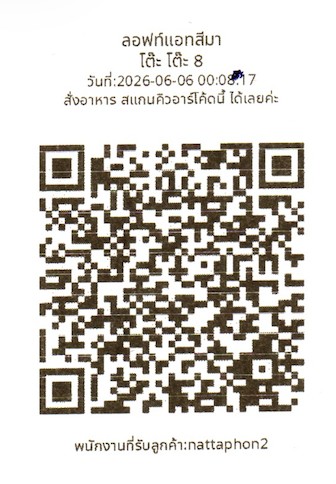
Slip shows restaurant name, table number, date/time, and 'Scan this QR to order food'. Customers see it and scan right away
🖨️ Press Order → Auto Print to Kitchen Instantly
When staff confirms an order, the kitchen printer prints the order slip immediately — no need to walk to the kitchen to tell the chef
Prints Instantly When Ordered
Order reaches the kitchen in 1 second. No waiting, no walking. Dramatically reduces order delivery time
Complete Info, Zero Mistakes
Slip shows table number, time, staff name, food items, and price — clearly. No handwriting errors
Kitchen Works Faster
Chef gets the slip immediately without waiting for staff to walk over. Handles busy hours easily
Sample order slip auto-printed to kitchen
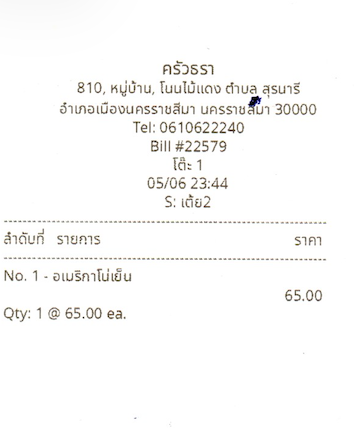
Slip shows restaurant name, bill number, table number, time, staff name, and food items with prices. Kitchen gets complete info instantly
Cloud System Works 24/7
Every staff member uses their phone to take orders + print receipts. Never crashes
⚠️ Real Story: PC Crashed During Peak Hours
A restaurant's PC got a virus during peak hours, the busiest time. Had to delete files, took 2 hours. Couldn't print receipts. Long queue, the restaurant was in chaos. Customers complained. Had to call a technician from the city, who took 3-5 days to arrive
💡 Lucky there's a Mobile Cloud system. Customers can use phones to take orders + print receipts anytime. No need to wait for PC repair.
Every Phone Works
5 staff members, 5 phones → if one crashes, others can replace it
Cloud Sync
Data syncs instantly across all devices. No fear of losing data
No Viruses
Doesn't use PC operating system. Mobile app is secure
24/7 Always On
Cloud server runs non-stop. Always available
Receipts on Any Phone
If one staff is busy, another can print receipts instead
Auto Update
System updates automatically. No manual updates needed
PC-Based vs Mobile Cloud POS
Choose the system that's safe and economical
| Topic | PC System ❌ | Mobile Cloud System ✓ |
|---|---|---|
| System Crash | ❌ Entire restaurant stops | ✓ Use another phone instead |
| Viruses | ❌ Risk every day | ✓ No risk (mobile apps don't use PC OS) |
| Repair Cost | ❌ Call technician, wait 3-5 days | ✓ No repair needed |
| Updates | ❌ Manual, complicated | ✓ Auto update |
| Hardware Cost | ❌ Each PC costs ~500-700 USD | ✓ Use phones you already have |
| Electricity Bill | ❌ PC runs 24/7, expensive | ✓ Phones charge as needed |
Why do 200+ restaurants choose Mobile POS?
No crash risk, no virus risk, save on hardware, easy to use, supports growth
3 Printers, No Need to Buy 3 Extra PCs
Printers connect to WiFi. Print instantly. No PC driver needed
❌ Old System
✓ Our System
💰 You Save
~$4,500 + $100-150/month
+ ไม่มีค่าใช้จ่าย hardware เพิ่มเติม + ประหยัดค่าไฟและค่าซ่อมบำรุง
วิธีการเชื่อม Printer WiFi
1️⃣ Plug
Connect printer to power normally. No need to connect via USB to a PC
2️⃣ Connect
Printer finds WiFi → Connect → Done
3️⃣ Auto
Customer pays → System sends → Printer prints automatically
Scan Market Bills in 3 Seconds
No manual entry needed. Our AI reads your delivery order and records the expense automatically.
Take a Photo
Use your phone camera to photograph the delivery order, or upload an existing image.
AI Reads the Text
Our OCR engine reads the numbers and text in the bill, showing results with a confidence score.
Confirm & Save
Review the data, tap confirm — the expense is recorded instantly.
Verify Bill Reading Results
✕Delivery Order
DELIVERY ORDER 16/4/69
Expense Item
Drinking Water - Loft At Sima × 100
Amount
3,300.00
Professional Receipts with Complete Details
Smart printing system that supports discounts, service charges, taxes, and change automatically
Discounts
Support percentage (%) or fixed amount discounts. System calculates total automatically
Service Charge
Set any service charge (10% or custom). Support EXCLUDED (shown separately) and INCLUDED (in price) modes
Tax (VAT)
Support 7% VAT in VAT_EXCLUDED and VAT_INCLUDED modes. Compliant with Thai tax law
Cash & Change
Show amount received and calculate change automatically. Prevent mistakes
Payment Methods
Support cash, bank transfer, credit card. Show reference number on receipt
Direct Printing
Connect Thermal printer instantly. No driver installation needed
Check Bill
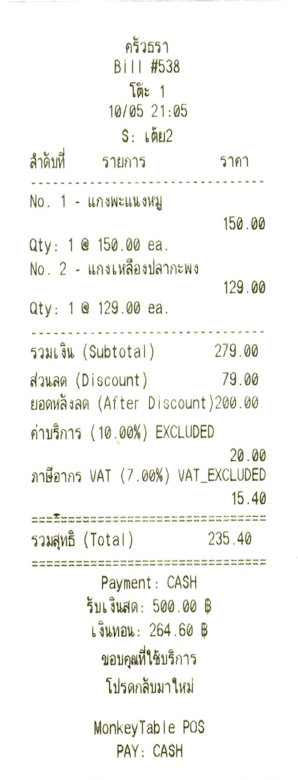
Amount, discount, service charge, tax shown clearly
Payment Receipt
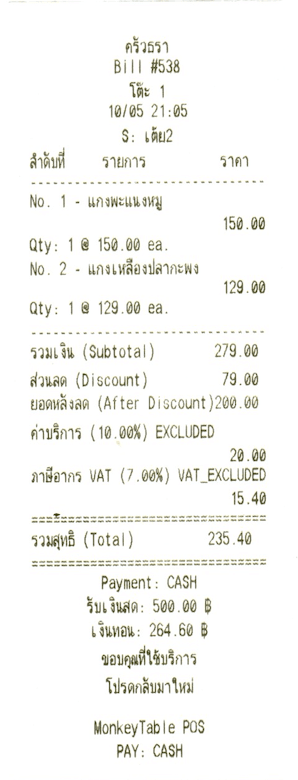
Amount received, change, payment method specified clearly
✅ Data Shown on Receipt:
Digital Recipes for Every Dish
Solve the problem of new kitchen staff needing to find handwritten recipe notebooks
Old Problem
New kitchen staff had to find handwritten recipe notebooks. During busy hours couldn't read them. Recipes got lost often
New Solution
When customer orders, system sends recipe slip to kitchen printer with all ingredients and steps
📱 View on Phone
Kitchen staff see recipe instantly on their phone
🖨️ Print Slip
Recipe prints to kitchen printer with all ingredients and instructions
🎨 Clear Format
Ingredients, method, notes (no spice, no egg) — everything clearly separated
📚 No Lost Recipes
Recipes stored in system, no need to keep notebooks
Recipe Slip Example
When customer orders, the system automatically prints a recipe slip to the kitchen printer. New kitchen staff can take the slip and prepare ingredients immediately. No need to open a recipe notebook. This helps speed up work significantly when there are many orders.
- ✓No need to open notebook, can do it instantly
- ✓Complete recipe with ingredients, method, and warnings
- ✓New staff can use it, no long training needed
📋 Actual slip example
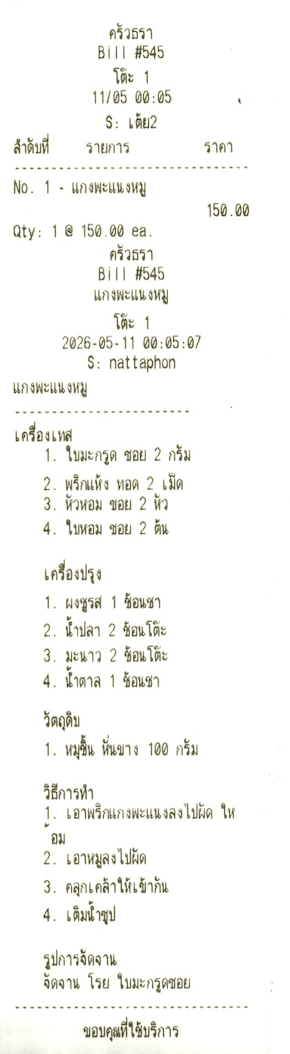
✅ Each slip prints one by one. Kitchen staff take the slip and prepare ingredients. Can start the order immediately
🌏 Recipes in Thai · English · Lao · Burmese
Foreign kitchen staff can read recipes instantly — no translation needed, no explanation required. Get it right every time
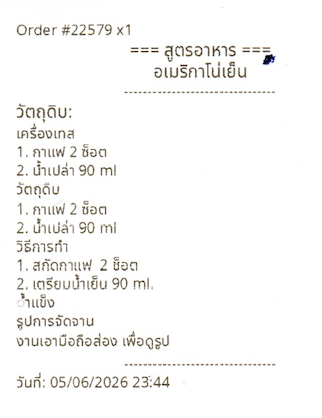
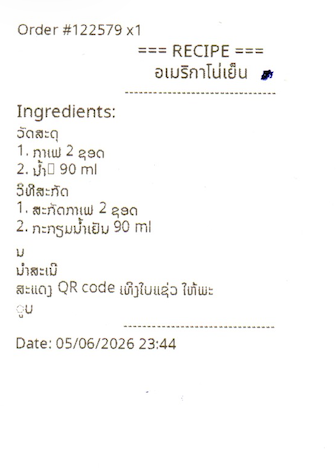
When staff confirms an order, the system automatically prints the recipe slip to the kitchen — showing ingredients, cooking steps, and plating instructions in the kitchen worker's language. Reduces mistakes and speeds up work
Thai
Thai chefs can read instantly — complete ingredients and instructions
English
Supports staff who read English
Lao
Lao workers follow the recipe correctly — no guessing
Burmese
Burmese workers understand the slip and can start immediately
✅ Auto-prints multilingual recipe slips — supports multiple languages in one slip. Foreign kitchen workers perform correctly right away, reducing language-related mistakes
Thai recipe slip
Lao recipe slip
🎯 Key Benefits
Save Time
No need to search for notebook
Learn Quickly
New staff can do it
Clear
No confusion
Easy Access
Available on phone
Photograph Bill, AI Records Expenses
Photo your market receipt. AI reads numbers and updates costs automatically. So easy
How It Works:
1️⃣ Buy from Market
Keep your delivery order or receipt from market
2️⃣ Take Photo
Use phone to photograph bill, vendor handwriting, prices, quantities — everything
3️⃣ AI Reads Text
OCR system reads text from image, identifies ingredients and prices
4️⃣ Record Cost
Update ingredient costs in system, calculate profit per menu item
Cash Receipt from Market (Vendor Handwriting)
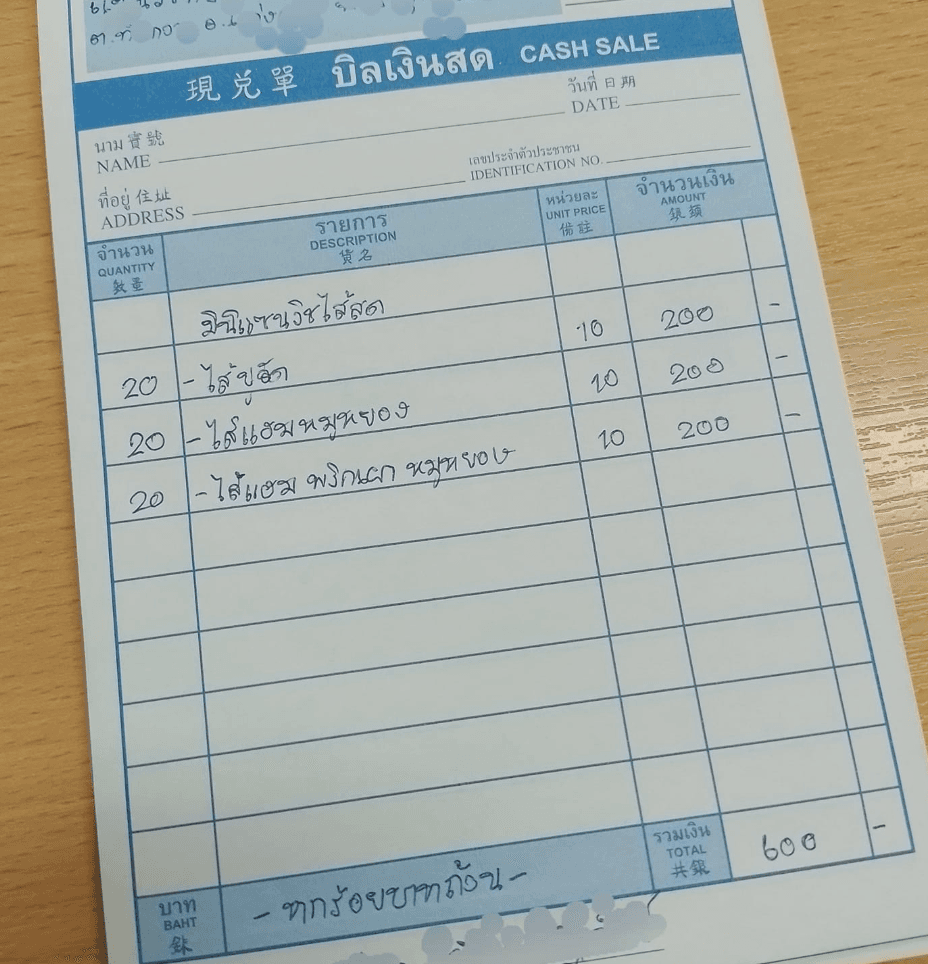
✅ Our AI can read vendor handwriting, numbers, prices, and quantities accurately
⏱️ Save Time
No manual entry. Just photograph bill, system handles rest
🎯 Accurate Costs
Real data from market bills. Calculate actual costs
🔍 Easy Audit
Keep photos of bills. Managers can audit anytime
💰 Better Analysis
Know where money goes. See true profit margin
🚀 Make Cost Tracking Easy and Accurate
No need to type data. Just take a photo. Our AI handles the tedious work for you.
Ready to Use in 5 Minutes
No software installation. No IT knowledge required.
1.Sign Up Free
Fill in your restaurant details in 2 minutes. No credit card needed.
2.Set Up Menu & Inventory
Add menu items, ingredients, and selling prices. The system calculates costs for you.
3.Start Right Away
Take orders, scan bills, view reports — everything is ready immediately.
Start Free, No Commitment
Try all features free for a full year. No credit card needed.
Free 1 Year
Start Today- ✓Unlimited AI Bill Scanning
- ✓POS Order Management
- ✓Inventory Management
- ✓Basic Reports
- ✓1 Branch
- ✓Line Support
Starter
After Promo- ✓Everything in Free
- ✓Advanced Reports
- ✓Staff Management
- ✓Auto Backup
- ✓1 Branch
- ✓Line & Phone Support
Pro
Recommended- ✓Everything in Starter
- ✓Unlimited Branches
- ✓Deep AI Analytics
- ✓Loyalty Program
- ✓API Integration
- ✓24/7 Support
* Promotional pricing. Contact us via Line or phone for more details.
We're Here Every Step of the Way
Our team is ready to advise and set up the system for you — for free.
Address
Loft At Sima Co., Ltd. (Head Office)
806 M.2, Suranari, Mueang, Nakhon Ratchasima 30000